|
Set Plot X-Axis Format
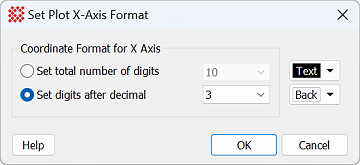
The Set Plot X-Axis Format command controls
the display format for the X axis coordinate readout of the
Plot Bar.
|
Set Plot X-Axis Format Properties
|
|
Coordinate Format for X Axis
|
|
 Set total number of digits Set total number of digits
|
Use this option to use the drop list to select the
maximum number of displayed digits. For example, selecting "6" with
the coordinate value 123.456789 would display 123.456.
|
|
 Set digits after decimal Set digits after decimal
|
Use this option to use the drop list to select the
number of digits right of the decimal point. For example, choosing
"2" with coordinate value 123.456789 would display 123.45.
|
|
[Text]
|
Sets the color of the text.
|
|
[Back]
|
Sets the color of the text background.
|
Related Topics
Set Plot Y-Axis Format
Plot Bar
Plot Windows
Mira Pro x64 8.83 User's Guide, Copyright Ⓒ 2026 Mirametrics, Inc.
All Rights Reserved.
|


