|
Open Command
The Open command opens files containing
image data, CSV grid data, plain text, etc., into the appropriate
Mira view window, including
Image Windows,
Report Windows,
Text Editor Windows, and others. This command also
opens files from a
File List. For FITS files only, the
Open FITS File command is a more versatile version of
this command.
See the section below regarding FITS File support
provided by this command.
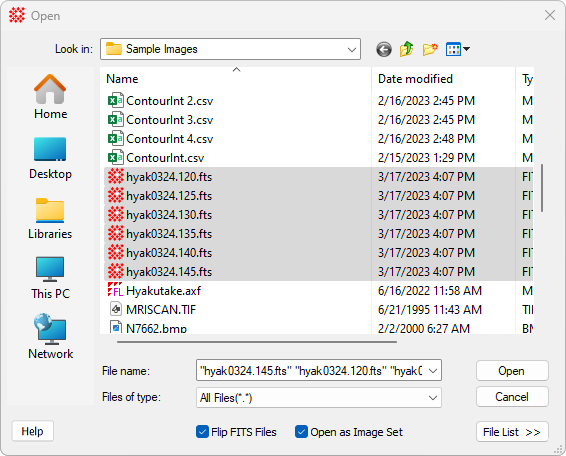
Open Dialog Properties
|
 Flip FITS Images Flip FITS Images
|
Check this box to flip FITS format images so that
row number increases downward, in the way computer displays are
scanned top to bottom. The FITS format standard states that arrays
stored in FITS files shall be displayed with row number increasing
upward. However, many FITS format applications expect row number to
increase in the top-down order. Check this box if the image being
opened shall be displayed in top-down ("flipped") order.
|
|
Open as Image Set
|
Check this box to open all selected images
together in a single
Image Window. If unchecked, each image is opened in a
different window.
|
|
[File List >>]
|
Opens the selected images or selected
file list in a
File List Editor. Use this for editing a file list
before opening or to create a file list from the marked images. A
file list can also be opened by directly selecting an axf file.
|
|
[Help]
|
Click this button to open "Topic Help" for the
Open FITS File command.
|
Details on FITS File Support
This command directly opens "classic" FITS files
containing one Header-Data Unit ("HDU") and an image with
NAXIS = 2 (see
FITS Format Overview and
FITS File Summary). For full FITS file support, use
the
Open FITS File command. Below are the limitations of
the Open command for some types of FITS files:
-
An extended FITS file with mutiple HDUs may be
opened, but the
FITS File Summary command is called for selecting one
HDU.
-
A so-called "data cube" image with NAXIS > 2 may be opened, but only the first
image plane (i.e., the first 2-dimensional array in the HDU) is
used.
-
Use the
Open FITS File command for FITS files having multiple
HDUs, an HDU image array with NAXIS >
2, or a
File List containing such files.
Image Sets and File Lists
The Mira File Open dialog includes support
for
Image Sets and
File Lists:
-
If you select more than 1 file, Mira adds
support for opening the files as an
Image Set in addition to the normal process of
opening all files in separate windows. This is theOpen as Image Set check box.
-
If the format being opened is recognized as an
image file or as a
File List (.axf file), Mira enables File List
functionality through the [File List
>>] button.
In addition to the selection of standard File
Formats such as FITS and TIFF, Mira adds support for
File Opening Plug-ins. These plug-ins can be
used to open files in formats that are otherwise unsupported.
Related Topics
Contents
Open FITS File
FITS File Summary
Image Sets
Working with File Lists
Opening & Saving Files
Create Image Keyword List
Mira Pro x64 8.83 User's Guide, Copyright Ⓒ 2026 Mirametrics, Inc.
All Rights Reserved.
|


