|
Select Image Properties
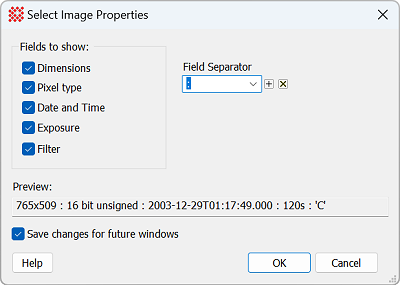
The Select Image Properties command chooses
which properties are displayed in the properties display area of
the Image Bar. Check boxes in this dialog choose which properties
are listed. Properties are separated in the display using the
characters specified in the Field
Separator box. This field may not be directly edited. The
displayed comments use the characters specified in theField Separator box.
|
Select Image Properties
|
|
Fields to show
|
|
 Dimensions Dimensions
|
Lists the image dimensions as "columns x rows". In
FITS format these are the values of the NAXIS1 and NAXIS2
keywords.
|
|
Pixel
Type
|
Lists the pixel Pixel Type. In FITS format, this
is a text equivalent of the value in the BITPIX keyword.
|
|
Date and
Time
|
Lists the date and time the image was acquired. In
FITS format, the value shown comes from the DATE-OBS keyword.
|
|
Exposure
|
Lists the exposure time in seconds. In FITS
format, this is the value in the EXPTIME keyword.
|
|
Filter
|
Lists the filter name held in the FILTER keyword.
|
|
Field Separator
|
Enter one or more characters that separate the
items in the properties list. For example, to get a colon
separator, enter :.
|
|
Preview
|
This field shows the effect of the current
property selections and the field separator.
|
|
Save
changes for future windows
|
Check this box to apply the changes to future
windows. Otherwise, the selections apply only to the current Image
Window.
|
Related Topics
Image Bar
Select Comment Properties
Image Windows
Pixel Types
FITS Keywords
FITS Header Pane
Mira Pro x64 8.83 User's Guide, Copyright Ⓒ 2026 Mirametrics, Inc.
All Rights Reserved.
|


