|


|


|
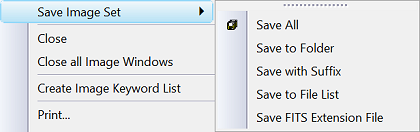
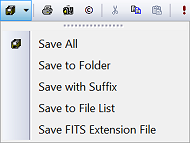
Saving Image Sets Mira provides two ways to save a displayed Image Set in addition to standard commands for saving a single image. When an Image Set is dipalsyed, the standard Save & Save As commands may be used to save the top-most image that is currently displayed.
CommandsSave All saves all members of the Image Set using their current names. This is the Image Set equivalent of the Save command. It uses the Ctrl+Shift+S shortcut. Save to Folder saves the image set to a different folder but using the same names. It uses the Ctrl+F shortcut. Save with Suffix saves the image set (or a single image) with a suffix added to their file names. This command can also save to a new folder. Save to File List saves the image names into a File List, or ".axf" file. This command does not save the images to files. Save FITS Extension File saves the images in the Image Set to FITS Extensions in a single FITS file. Related Commands:
Related Topics
Mira Pro x64 8.83 User's Guide, Copyright Ⓒ 2026 Mirametrics, Inc.
All Rights Reserved. |