|
Set Pixel Value Format
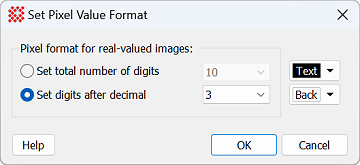
The Set Pixel Value Format command controls
the display of pixel values in the
Image Bar for images having a "real" Pixel Type,
including 32-bit and 64-bit real images. These settings do not
affect images having an integer Pixel Type.
|
Set Pixel Value Format Properties
|
|
Pixel format for real-valued images:
|
|
 Set total number of digits Set total number of digits
|
Use this option to use the drop list to select the
maximum number of displayed digits. For example, selecting "6" with
pixel values 1234.56789 and 12.34 would display them as 1234.56 and
12.34.
|
|
 Set digits after decimal Set digits after decimal
|
Use this option to use the drop list to select the
number of digits right of the decimal point. For example, choosing
"2" with pixel values 123.4567 and 1234567.8 would display them as
123.45 and 1234567.80.
|
|
[Text]
|
Sets the color of the text.
|
|
[Back]
|
Sets the color of the text background.
|
Related Topics
Image Bar
Set X-Axis Linear Format
Set Y-Axis Linear Format
Image Windows
Pixel Types
Mira Pro x64 8.83 User's Guide, Copyright Ⓒ 2026 Mirametrics, Inc.
All Rights Reserved.
|


