|


|


|
The Main Message Pane is a docking pane attached to the main Mira window frame that receives text messages from various Mira operations. Its contents may be copied to the Windows clipboard or saved to a file. Messages can accrue to the pane even while it is closed. As with all docking panes, this window can be pinned open or shrunk to a tab on the window border, or "tabified". The Main Measurement Pane layout is controlled using various commands and options:
The example below shows the Main Message Pane open at the bottom of the Mira window. In this example, it contains messages from the Create Pixel Mask command. If shrunk to tab form ("tabified"), only its small tab appears along the Mira window border, thus freeing up space for other work.
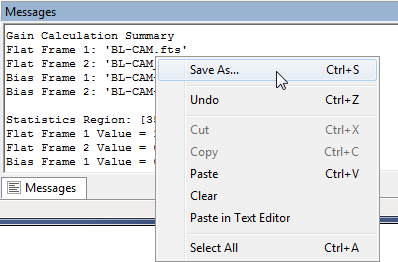
Working with Message PanesThe Message Pane has a right-click context menu containing some simple editing commands likeCut, Copy, Paste, Paste in Text Editor, etc. After transfering to a Text Editor window, the message text may be printed. For such operations, you can save its contents to a text file or paste into a Text Editor where the text can be further edited. To access the editor's tools, right-click inside the Message Pane to open its command menu, then select the Paste in Text Editor command from the menu. The text appears in a Mira Text Editor window. In this example, grayed commands are not accessible because they require marking a block of text before opening the menu to use the command..
Related Topics
Mira Pro x64 8.83 User's Guide, Copyright Ⓒ 2026 Mirametrics, Inc.
All Rights Reserved. |
 Main Message Pane
 button on the
 Auto save Pane Layout
 .
.