|
Rotational Gradient Filter
The Rotational Gradient Filter enhances
image features having angular detail in an image. This is
accomplished by a combination of shifting and rotating the image
relative to itself in a specified direction about a specific point
at which rotational detail originates. A dithering angle is used to
rotationally offset enhanced details to make them more visible. The
angle shift is very small but the much larger dithering angle helps
clarify the details revealed by the angle shift. See an
Example
-
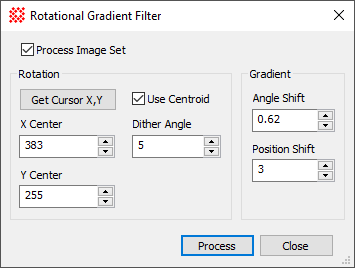
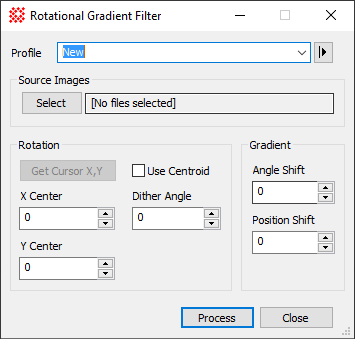
The Rotational Gradient Filter command
opens from the Image Window > Process > Filters menu and  button on the Main Toolbar. The "immediate" form, shown first,
opens when an image or image set is displayed in the top-most
window. The general form can be used to select source images from
folders, windows, or by matching templates. button on the Main Toolbar. The "immediate" form, shown first,
opens when an image or image set is displayed in the top-most
window. The general form can be used to select source images from
folders, windows, or by matching templates.
Rotational Gradient Filter Properties
|
Profile [|>]
|
Selects the parameter profile for this command and
allows you to save or work with existing presets.
|
|
[Select]
|
Opens the
Select Source Images dialog to choose images from an
image window, folder, files, name template, or a Mira File
List.
|
|
Direction
|
Specifies the azimuthal angle in which the local
image gradient (slope) is measured.
|
|
X Center
|
Specifies the X (column) coordinate at the center
of rotation and shift. A precise centroid value can be inserted by
clicking the Get Cursor X,Y
button.
|
|
Y Center
|
Specifies the Y (row) coordinate at the center of
rotation and shift. A precise centroid value can be inserted by
clicking the Get Cursor X,Y
button.
|
|
Get Cursor X,Y
|
Inserts the center coordinates of the
Image Cursor into the X
Center and Y Center fields. If
Use Centroid is checked, the centroid
position is calculated near the center of the image cursor. This
button is enabled only if the source image selection made using the
[Select] button refers to a displayed
image.
|
|
 Use Centroid Use Centroid
|
Check this box to cause the Get Cursor X,Y button to return an accurate
centroid position near the center of the
Image Cursor.
|
|
Angle Shift
|
Species the angle offset used to calculate the
angular gradient (intensity slope) value. This is often a small
value of 1 degree or less.
|
|
Position Shift
|
Species the position offset used to calculate the
spatial gradient (intensity slope) value. This is often a small
value of 1 degree or less.
|
Related Topics
Spatial Filter Commands
Gradient Filter
Laplacian Filter
Mira Pro x64 User's Guide, Copyright Ⓒ 2023 Mirametrics, Inc. All
Rights Reserved.
|


