|
Laplacian Filter
The Laplacian Filter calculates the local
second derivative of image values at each point in the image. This
filter is used to calculate the strength of edges and
discontinuities for features in the image. Different filter types
calculate the Laplacian value using a different local neighborhood
description. To calculate the directional gradient, or directional
first derivative, see the
Gradient Filter.
-
The Laplacian Filter command opens from
the Image Window > Process >
Filters menu and  button
on the Main Toolbar. The "immediate"
form, shown first, opens when an image or image set is displayed in
the top-most window. The general form can be used to select source
images from folders, windows, or by matching templates. button
on the Main Toolbar. The "immediate"
form, shown first, opens when an image or image set is displayed in
the top-most window. The general form can be used to select source
images from folders, windows, or by matching templates.
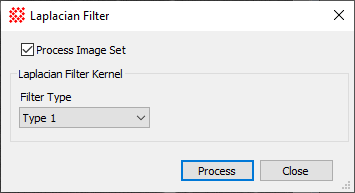
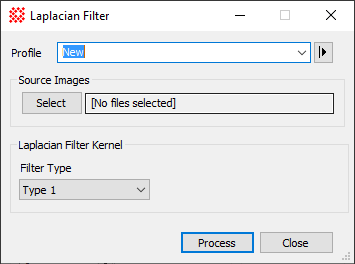
Laplacian Filter
|
Profile [|>]
|
Selects the parameter profile for this command and
allows you to save or work with existing presets.
|
|
[Select]
|
Opens the
Select Source Images dialog to choose images from an
image window, folder, files, name template, or a Mira File
List.
|
|
Filter Type
|
Provides options for specifying the local
neighborhood in different ways.
|
|
Source Region
|
Specifies the rectangular region to be processed.
The options are as follows:
Entire image: The
entire image is processed.
Image Cursor: The
region to be processed is selected using the Image Cursor.
Rectangle: The
region specified by Min
andMax limits for Column and Row
coordinates is processed.
Column and Row, Min and
Max: When Rectangle is
selected, these values specify the column and row limits to be
processed.
|
Related Topics
Spatial Filter Commands
Gradient Filter
Mira Pro x64 User's Guide, Copyright Ⓒ 2023 Mirametrics, Inc. All
Rights Reserved.
|


