|
Binomial Filter
The Binomial Filter applies a rectangular
filter whose weights are given by binomial coefficients. For large
size, n, the binomial filter approaches a
Gaussian Filter as the limiting case. The weights are
determined by the number of pixels in the width and height of the
filter kernel and may be different in each direction.
-
The Binomial Filter command opens from
the Image Window > Process >
Filters menu and  button
on the Main Toolbar. The "immediate"
form, shown first, opens when an image or image set is displayed in
the top-most window. The general form can be used to select source
images from folders, windows, or by matching templates. button
on the Main Toolbar. The "immediate"
form, shown first, opens when an image or image set is displayed in
the top-most window. The general form can be used to select source
images from folders, windows, or by matching templates.
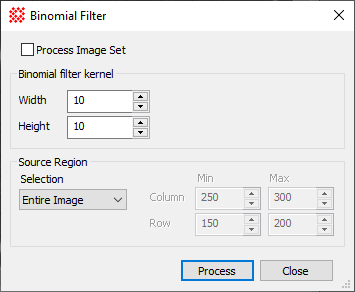
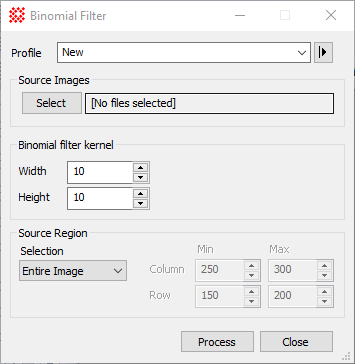
Binomial Filter Properties
|
Profile [|>]
|
Selects the parameter profile for this command and
allows you to save or work with existing presets.
|
|
[Select]
|
Opens the
Select Source Images dialog to choose images from an
image window, folder, files, name template, or a Mira File
List.
|
|
Width
|
Specifies the width of the binomial filter in
terms of pixels along the horizontal (row) direction. For example,
Width=3 gives uses the binomial
expansion for n=3 to set weights of 1,2,1.
|
|
Height
|
Specifies the height of the binomial filter in
terms of pixels along the vertical (column) direction. For example,
Height=4 gives uses the binomial
expansion for n=4 to set weights of 1,3,3,1.
|
|
Source Region
|
Specifies the rectangular region to be
processed:
Entire image
The entire image is processed.
Image Cursor
The region to be processed is selected using the
Image Cursor.
Rectangle
The region specified by Min and Max limits
for Column and Row coordinates is processed.
Column and Row, Min and
Max
When Rectangle is
selected, these values specify the column and row limits to be
processed.
|
Related Topics
Spatial Filter Commands
Gaussian Filter
Mira Pro x64 8.67 User's Guide, Copyright Ⓒ 2023 Mirametrics, Inc.
All Rights Reserved.
|


