|


|


|
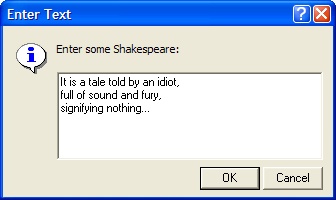
GetText The GetText function opens a dialog to request a multi-line text string. If you click [OK], the entered text is returned.
SyntaxsText, bOK = GetText() sText, bOK = GetText( s ) sText, bOK = GetText( s, sPrompt ) sText, bOK = GetText( s, sPrompt, sTitle )
RemarksAll arguments are optional and assume default values beyond the last argument you specify. In order to use a default argument but follow it with a specified argument, use a nil in its place. If the string uses multiple lines, the string should be formatting using the \r\n escape sequence (the so-called carriage return / line feed pair) to separate the lines. ExampleThe window shown above was created using the following code. The last argument, the window title, was omitted and left to the default:
Related Topics
Mira Pro x64 Script User's Guide, v.8.76 Copyright Ⓒ 2024
Mirametrics, Inc. All Rights Reserved. |