 |


|


|
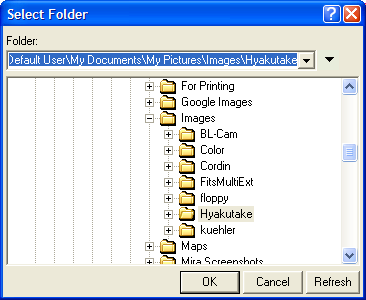
GetFolder The GetFolder function returns the name of a folder. The folder browser can access any folder on the system, including shared network folders and the Windows desktop. The selected folder is returned without a trailing backslash.
SyntaxsNewFolder, bOK = GetFolder( sStartFolder )
RemarksThe dialog consists of a history drop box at top, and a large tree control below. You can select folders from the history list, then click the down-arrow to update the new folder into the tree control. The [Refresh] button updates the tree with any file system changes that have occurred while the dialog is open. The initial path, sStartFolder, may look something like this (note the double backslashes in this literal string): "C:\\Documents and Settings\\Default User\\My Documents\\Images". If the user cancels the dialog using any closing method other than [OK], this function returns boolean false as the second argument. You do not have to use the second return value in the script. In this Windows version, Desktop item forms the root of the file system tree. If Desktop is selected and [OK] clicked, then the return value is an empty string, "", and bOK=true. Similarly, if Desktop\My Computer\C: is selected, then the return value is C:\. ExampleLet sPath = "C:\\Documents and Settings\\Default User\\My Documents". Then
opens the folder dialog at the position of "My Documents". The Assert following GetFolder is used to test how the user closed the dialog. If the user did not click [OK], then GetFolder() returns bOK=false. Related TopicsGetFileName
Mira Pro x64 Script User's Guide, v.8.76 Copyright Ⓒ 2024
Mirametrics, Inc. All Rights Reserved. |
 the string
