|
GetFileOpen
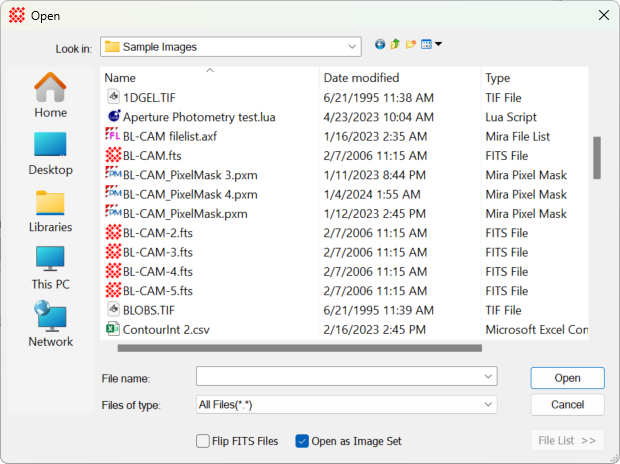
The GetFileOpen function uses the Windows
Open dialog to browse for a file name string but does not
open the file. The Open dialog's behavior can be modified by
passing parameters from a
FileNameParams table.
To override the default properties of this
function, you do not have to create a
FileNameParams table or specify all parameters.
Simply create a table and set the values using the exact names used
in the
FileNameParams table.
Syntax
sName, FileNameParams_New = GetFileOpen(
tblParams )
sName, FileNameParams_New = GetFileOpen()
sName = GetFileOpen( tblParams )
sName = GetFileOpen()
 tblParams is an optional table containing values
from the
FileNameParams table. If omitted, the internal
default
FileNameParams values are used. tblParams is an optional table containing values
from the
FileNameParams table. If omitted, the internal
default
FileNameParams values are used.
FileNameParams_New is a
FileNameParams table containing updated values from
the Open dialog. You do not have to catch or use this returned
table.
sName is the full path name of the selected
file.
If the
[Open] button is clicked, sName and FileNameParams_New are returned.
If the dialog
was closed using [Cancel] or
[X],
nil,
nil is returned.
Examples
The scripts below show the use of
GetFileOpen with and without overriding the
FileNameParams values.
|
sName =
GetFileOpen()
|
|
|
if sName then
Printf("name=%s\n",sName) end
|
|
|
|
|
|
Params =
|
|
|
{
|
|
|
sOpenTitle = "Open the
Source File",
|
|
|
}
|
|
|
str =
GetFileOpen(Params)
|
|
|
|
|
|
Params =
|
|
|
{
|
|
|
sOpenTitle = "Open the
Source File",
|
|
|
}
|
|
|
str, NewParams =
GetFileOpen(Params)
|
|
|
if str ~= nil then
|
|
|
Printf("Ext=%s\n",
NewParams.sFileExt)
|
|
|
end
|
|
Related Topics
Dialog Functions
Directory Functions
new_fileopen
GetFileSave
FileNameParams
GetString
SetFlipFITS
GetFolder
Mira Pro x64 Script User's Guide, v.8.76 Copyright Ⓒ 2024
Mirametrics, Inc. All Rights Reserved.
| 


