|
CGridCtrl Class Description
The CGridCtrl class provides access to the
grid control used by Report windows and panes on the Mira desktop
and grid windows created from a script using
new_gridview and
new_griddlgmodal . Mira uses grid controls to display
a 2-dimensional grid of measurements and other values.
The
CGridView class can create a grid window from the
script or attach a grid window already on the Mira desktop. A
script can be used to work with the cell data for example, to do
further processing like computing statistics using the
CStats class, performing least squares fitting using
the
CLsqFit class, and so forth. If your script
creates a grid, the Grid Window has full access to the Mira GUI
functions such as Mira pull-down and pop-up menus, or it can
execute a new script as described below.
This class is similar to the
CGrid class but offers more functionality. The
primary differences between the CGridView and CGrid
classes are as follows:
 The
CGrid does not support all features of the CGridView
class, including multiple grid
sheets. The
CGrid does not support all features of the CGridView
class, including multiple grid
sheets.
Whereas the
CGridView class can either create a grid window or attach to
an existing grid window, the CGrid class can only create a
dialog window and cannot attach to an existing grid.
Note that scripts executed from a
CGrid dialog, Mira Grid View window, or Grid Pane are all
provided a CGridView object for manipulating the grid window
that launched the script.
Grid Controls
A grid control is a table consisting of cells
arranged in a rectangular grid defined by the number of columns
wide and the number of rows tall. Just as a Mira image window holds
an image set consisting of multiple images, the Mira grid window
holds a set of grids called "sheets". By default, a
CGridCtrl is created with 1 sheet, but you may create it
with additional sheets using the
GridParams table or add sheets later by using
AddSheet . You may switch between sheets using the
tab below the grid window or using
SelectSheet in a script. NOTE: All grid
commands work with the top-most sheet in the grid window.
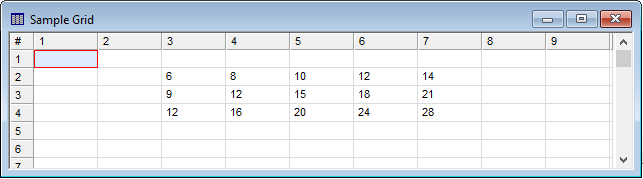
Below is a simple grid view window created by the
CGridView class. Use the present CGridCtrl class to
work with its grid control.
Executing Scripts from Grid Windows and Grid Panes
The Execute Script menu command may be used
to open and execute a script directly from a Mira Grid Window. When
a script is executed from this command, it is automatically sent a
CGridView object named ParentGrid that provides access to the window's
grid control. You can use this name directly in the
script or you can rename it, likeG =
ParentGrid. A sample script to be called from a Grid Window
is provided, namedExecute from Grid Window
test.lua.
A script can also be executed from a Grid Pane
(e.g., containing measurements) attached to an Image Window. In
this case, the Execute Script command
is available only using the pane's pop-up menu opened using a right
mouse click. A sample script to be called from a Grid Pane is
provided, named Execute from Grid Pane
test.lua.
Usage
|
Construction
|
Object = new_gridctrl()
Object = attach_gridctrl()
Object = attachlist_gridctrl()
Object = CGridCtrl:new()
Object = CGridCtrl:Attach()
Object = CGridCtrl:AttachFromList()
|
|
Destruction
|
Object:delete()
|
Creator Functions
These functions are normally used to create and
attach a new CGridView object as an alternative to the
class-based construction methods.
CGridCtrl Methods
|
AddSheet
|
Adds a sheet to the CGridCtrl object.
|
|
BestFit
|
Adjusts the grid within the window for best fit
over a range of columns.
|
|
FindCol
|
Finds the column containing the specified string.
This is often used to find a grid column using its top heading
title. You may also search for the string within a specific
row.
|
|
FindRow
|
Finds the row containing the specified string.
This is often used to find a grid row using its side heading title.
You may also search for the string within a specific column.
|
|
FromTable
|
Sets grid cells to the contents of a 2-dimensional
table.
|
|
GetCellStart
|
Returns the grid column and row where the mouse
button was last pressed to mark a cell or begin a selection.
|
|
GetCellEnd
|
Returns thegrid column and row where the mouse
button was last released to mark the last cell of a selection.
|
|
GetCellDblClick
|
Returns the grid column and row where the mouse
button was last double-clicked.
|
|
GetCol
|
Returns a 1-dimensional table containing the
contents of a grid column.
|
|
GetNum
|
Returns the numeric value in a grid cell.
|
|
GetMaxCol
|
Returns the index of the maximum grid column
containing data.
|
|
GetMaxRow
|
Returns the index of the maximum grid row
containing data.
|
|
GetNumCols
|
Returns the number of columns in the grid.
|
|
GetNumRows
|
Returns the number of rows in the grid.
|
|
GetNumSheets
|
Returns the number of sheets in the grid.
|
|
GetRect
|
Returns a 2-dimensional table containing the
contents of a grid rectangle.
|
|
GetRow
|
Returns a 1-dimensional table containing the
contents of a grid row.
|
|
GetSheet
|
Returns the index of the currently selected
sheet.
|
|
GetStr
|
Returns the string value in a grid cell.
|
|
GetType
|
Returns the data type for a grid cell.
|
|
GetVal
|
Returns the data and pixel type of a grid
cell.
|
|
GetWndTitle
|
Returns the title of the window or docking pane
containing the grid control.
|
|
GotoCell
|
Sends the grid cursor to the specified cell.
|
|
JoinCells
|
Joins a block of cells into a single cell.
|
|
Optimize
|
Optimizes the width of one or more columns.
|
|
Refresh
|
Refreshes the grid to update undisplayed
changes.
|
|
SelectSheet
|
Selects a specified sheet and brings it to the top
of the grid window.
|
|
SetBkColor
|
Sets the background color of a cell.
|
|
SetCellHorzAlign
|
Set the horizontal alignment of a specific cell.
The default alignment is "left".
|
|
SetCellVertAlign
|
Set the vertical alignment of a specific cells.
The default alignment is "vertical center".
|
|
SetFontColor
|
Sets the text color of a cell.
|
|
SetCol
|
Saves the contents of a 1-dimensional table to a
grid column.
|
|
SetNum
|
Sets a numeric value to a grid cell.
|
|
SetNumCols
|
Sets number of columns in the grid.
|
|
SetNumRows
|
Sets the number of rows in the grid.
|
|
SetRect
|
Sets the values inside a rectangle of the
grid.
|
|
SetStr
|
Sets a string value to a grid cell.
|
|
SetTab
|
Sets the label of the tab for a sheet.
|
|
SetType
|
Sets the data type of a cell. Cells default to
string data type.
|
|
SetVal
|
Sets a cell value and pixel type in the grid.
|
|
ToTable
|
Converts the grid contents to a 2-dimensional
table.
|
|
SetHorzAlign
|
Set the horizontal alignment of specific cells or
an entire column. The default alignment is "left".
|
|
SetVertAlign
|
Set the vertical alignment of specific cells or an
entire row. The default alignment is "vertical center".
|
|
UnJoinCells
|
Breaks a block of joined cells into individual
grid cells.
|
Related Topics
Script Classes
CGridView class
CGrid class
Contents
Mira Pro x64 Script User's Guide, v.8.76 Copyright Ⓒ 2024
Mirametrics, Inc. All Rights Reserved.
| 


