Apply Pixel Mask
The Apply Pixel Mask command corrects point
artifacts in an image by obtaining their coordinates from a pixel
mask. The pixel mask is created using the Create Pixel Mask
command or Edit Pixel
Mask command.
-
The Apply Pixel Mask command opens from
the Image Window > Process >
Calibration menu and  button
on the Main Toolbar. The "immediate"
form, shown first, opens when an image or image set is displayed in
the top-most window. The general form can be used to select source
images from folders, windows, or by matching templates.
button
on the Main Toolbar. The "immediate"
form, shown first, opens when an image or image set is displayed in
the top-most window. The general form can be used to select source
images from folders, windows, or by matching templates.
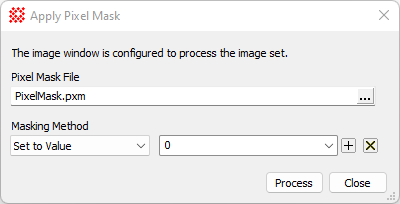
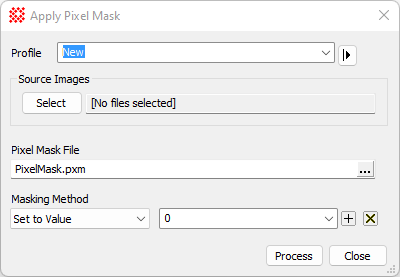
Apply Pixel Mask Properties
|
Profile [|>]
|
Selects the parameter profile for this command and
allows you to save or work with existing presets.
|
|
[Select]
|
Opens the Select Source Images dialog to choose images
from an image window, folder, files, name template, or a Mira File
List.
|
|
Pixel Mask File
|
Enter a name for the pixel mask file or click
[...] to browse for a file name.
|
|
Masking Method
|
Select the method to use for correcting the
artifacts.
|
|
Value
|
Specify the value to set when "Value" is selected
for the Masking Method.
|
Related Topics
Repairing Artifacts and Cosmetic Defects, Clean Image Set, Cosmic Ray Filter,
Create Pixel
Mask, Edit Pixel
Mask, Apply
Blemish Mask, Express Image Calibration, Cosmetic
Correction Properties
Mira Pro x32 User's Guide, Copyright Ⓒ 2023 Mirametrics, Inc. All
Rights Reserved.